Showing posts with label blogger. Show all posts

Who Visited Your Facebook Profile

Who Visited Your Facebook Profile

Many Facebook users want to know about who is visited there Facebook profile today, but Facebook not provides these types of feature to know who is visited there Facebook profile today. Here a will give you some awesome idea to know about who is visited your Facebook profile today.

Who Visited Your Facebook Profile

For know who visited your Facebook profile today just use "profile visitor for Facebook"

How to use profile visitor for Facebook

  • Install "Profile Visitors For Facebook" extension on your chrome/firefox browser. Click Here
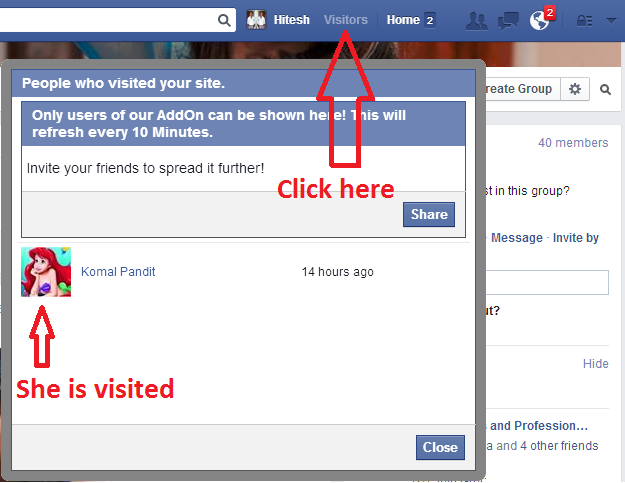
  • Login to your Facebook account. Now, you can see a “Visitors” button at your Facebook topbar, next to Facebook notification icon.
  • Upon clicking, a pop-up window will appear telling you, who have visited your Facebook profile recently. So, whenever anyone visit your Facebook profile, you’ll be able to see them in this Profile visitors for Facebook pop-up box.
profile visitor for Facebook

Profile visitors for Facebook only works for those people who have installed this extension on their chrome browser. So, share this 100% realFacebook profile viewer app with your Friends. The more your friends will install Profile visitors for Facebook, the more you’ll be able to track if they’ve visited your Facebook profile today.

Tricks to Find Facebook Profile ID

Tricks to Find Facebook Profile ID

 Find Facebook Profile ID
Here i will give you some awesome tricks to find Facebook profile ID of any persion who have custom user name. Just follow some given steps.

Steps to Find Facebook Profile ID

  • Go to the profile you want to find Profile ID
  • That URL will look like this www.facebook.com/username
  • Change that URL to graph.facebook.com/username
  • Then you will get something like below image.

Find Facebook Profile ID
I hope you enjoy with this.

Automatically Invite all friends for Like your Facebook Fan page

Automatically Invite all friends

Automatically Invite all friends for Like your Facebook Fan page

Social medias are play most important role to fetch a lot of traffics on websites or blog. Here we are discuss on how to increase fan page likes of blog or sites ? For Facebook fan page it is very difficult to invite friends to like our page, so here we learn how to invite all friends at once ?

Steps to Invites all Friends

  1. Open your Facebook fan page, where you desired to invite your friends.
  2. Now just navigate to Build Audience > Invite option.
  3. Now, a dialog box will be appear with invite option with all your friends name.
  4. Press F12 to open inspect element tab.
  5. Go to the console tab and copy paste the following script.
var inputs = document.getElementsByClassName('uiButton _1sm'); for(var i=0; i<inputs.length;i++) { inputs[i].click(); }


  1. After pasting above code into console tab, Hit enter and then see the magic ! all your friends will be invited to like your Facebook page.

Floating Social Sharing Vertical Button

Floating Social Sharing Vertical Button

Floating Social Sharing Vertical Button With Counter

This is social sharing vertical widgets which is float on your web-page, This widget encourage the visitors on your sites or blog.It is make easy for visitors to share your web-pages on social sites. This is increase the popularity of  your web-page and bring more traffics on your web-page

How to add this widget ?
    1. To add widget fist login your blogger account.
    2. Go on blog title.
    3. Go on layout.
    4. Add widget.
    5. Now choose HTML/JavaScript.
    6. Add/Paste the given below code.

        Click Here For Detail to add a widgets.


        <div style="position:fixed; left:50px; top:130px; box-shadow: 0px 2px 6px rgba(0,0,0,0.2); pandding:5px; backgroung:none repeat scroll 0% 0% #ffffff;border-radius:5px 5px 5px 5px;">
        <div class="pw-widget pw-vertical pw-counter-vertical">
        <a class="pw-button-facebook pw-look-native"></a>
        <a class="pw-button-googleplus pw-look-native"></a>
        <a class="pw-button-pinterest pw-look-native"></a>
        <a class="pw-button-twitter pw-look-native"></a>
        <a class="pw-button-linkedin pw-look-native"></a>
        <a class="pw-button-tumblr pw-look-native"></a>
        <a class="pw-button-post-share"></a><small style="float: right; font-size:9px" title="Get widget @ sites18.com">
        <a href="http://sites18.com/" >Get@wg</a>
        </small>
        </div>
        <script src="http://i.po.st/static/v3/post-widget.js#publisherKey=k4afsojgqsuulmmpsj8d%22%20type=%22text/javascript">
        </script >
        <script >
        var pwidget_config = 
        {
        copypaste: false;
        }
        </script >
        </div>


        div style="position:fixed; left:50px; top:130px; box-shadow: 0px 2px 6px rgba(0,0,0,0.2); pandding:5px; backgroung:none repeat scroll 0% 0% #ffffff;border-radius:5px 5px 5px 5px;">
        <div class="pw-widget pw-vertical pw-size-large">
        <a class="pw-button-facebook"></a>
        <a class="pw-button-googleplus"></a>
        <a class="pw-button-pinterest"></a>
        <a class="pw-button-twitter"></a>
        <a class="pw-button-linkedin"></a>
        <a class="pw-button-tumblr"></a>
        <a class="pw-button-reddit"></a>
        <a class="pw-button-stumbleupon"></a>
        <a class="pw-button-post"></a>
        <small style="float:right; font-size:9px"title="Get widget @ sites18.com" >
        <a href="http://sites18.com/" >Get@wg</a>
        </small>
        </div>
        <script src="http://i.po.st/static/v3/post-widget.js#publisherKey=k4afsojgqsuulmmpsj8d%22%20type=%22text/javascript">
        </script >
        <script >
        var pwidget_config =
        {
        copypaste: false;
        }
        </script >

        </div>


        Multi Colored Popular post widgets for blogger

        This Popular posts is a widget provided for blogger which shows a list of most viewed posts from your blog. this widget is being initiated by DTE. This widget uses CSS trick we will customize popular posts widget with awesome style.The main part of this hack is you don't need to add any heavy JavaScript or any other scripts we will apply this hack with using only CSS. Also you can customize this widget with using blogger template designer.Let's go to the tutorial.

        How To Add This Widgets To Blogger

          1. Go to Blogger Dashboard --> Template --> Edit HTML --> Proceed
          2. Backup your Template before making any changes to your blog
          3. Now Expand Widget Templates
          4. Press Ctrl+F and search the code shown below
          5. Now Find the code shown below using Ctrl+F 

          Or

          Watch The Below Video
            ]]></b:skin>

            Now paste the Code Shown Below Just above/before it.
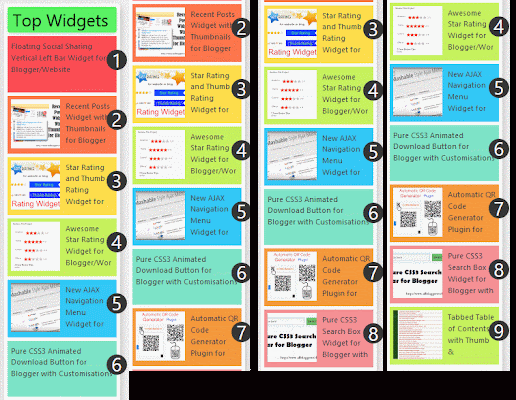


            Colored post

            #PopularPosts1 ul{margin:0;padding:0px 0;list-style-type:none}
            #PopularPosts1 ul li{position:relative;margin:5px 0;border:0;padding:5px}
            #PopularPosts1 ul li:first-child{background:#ff4c54;width:94%}
            #PopularPosts1 ul li:first-child:after{content:"1"}
            #PopularPosts1 ul li:first-child + li{background:#ff764c;width:94%}
            #PopularPosts1 ul li:first-child + li:after{content:"2"}
            #PopularPosts1 ul li:first-child + li + li{background:#ffde4c;width:94%}
            #PopularPosts1 ul li:first-child + li + li:after{content:"3"}
            #PopularPosts1 ul li:first-child + li + li + li{background:#c7f25f;width:94%}
            #PopularPosts1 ul li:first-child + li + li + li:after{content:"4"}
            #PopularPosts1 ul li:first-child + li + li + li + li{background:#33c9f7;width:94%}
            #PopularPosts1 ul li:first-child + li + li + li + li:after{content:"5"}
            #PopularPosts1 ul li:first-child + li + li + li + li +li{background:#7ee3c7;width:94%}
            #PopularPosts1 ul li:first-child + li + li + li + li + li:after{content:"6"}
            #PopularPosts1 ul li:first-child + li + li + li + li + li +li{background:#f6993d;width:94%}
            #PopularPosts1 ul li:first-child + li + li + li + li + li + li:after{content:"7"}
            #PopularPosts1 ul li:first-child + li + li + li + li + li + li +li{background:#f59095;width:94%}
            #PopularPosts1 ul li:first-child + li + li + li + li + li + li + li:after{content:"8"}
            #PopularPosts1 ul li:first-child + li + li + li + li + li + li + li +li{background:#c7f25f;width:94%}
            #PopularPosts1 ul li:first-child + li + li + li + li + li + li + li + li:after{content:"9"}
            #PopularPosts1 ul li:first-child:after,
            #PopularPosts1 ul li:first-child + li:after,
            #PopularPosts1 ul li:first-child + li + li:after,
            #PopularPosts1 ul li:first-child + li + li + li:after,
            #PopularPosts1 ul li:first-child + li + li + li + li:after,
            #PopularPosts1 ul li:first-child + li + li + li + li + li:after,
            #PopularPosts1 ul li:first-child + li + li + li + li + li + li:after,
            #PopularPosts1 ul li:first-child + li + li + li + li + li + li + li:after,
            #PopularPosts1 ul li:first-child + li + li + li + li + li + li + li + li:after{position:absolute;top:20px;right:-15px;border-radius:50%;background:#353535;width:30px;height:30px;line-height:1em;text-align:center;font-size:28px;color:#fff}
            #PopularPosts1 ul li .item-thumbnail{float:left;border:0;margin-right:10px;background:transparent;padding:0;width:70px;height:70px;}
            #PopularPosts1 ul li .item-snippet{display:none}
            #PopularPosts1 ul li .item-title{text-overflow:ellipsis;overflow:hidden;height:70px}
            #PopularPosts1 ul li a{line-height: 1.2em;font-size:11px;color:#444;text-decoration:none}
            #PopularPosts1 ul li a:hover{color:#222;text-decoration:none}
            #PopularPosts3 img{
            -moz-border-radius: 130px;
            -webkit-border-radius: 130px;
            border-radius: 130px;
            padding:4px;
            border:1px solid #fff !important;
            background: #F2F2F2;}#PopularPosts1 img:hover {
            -webkit-transition: all 0.3s ease;
            -moz-transition: all 0.3s ease;
            transition: all 0.3s ease;
            -moz-transform: scale(1.2) rotate(-740deg) ;
            -webkit-transform: scale(1.2) rotate(-740deg) ;
            -o-transform: scale(1.2) rotate(-740deg) ;
            -ms-transform: scale(1.2) rotate(-740deg) ;
            transform: scale(1.2) rotate(-740deg) ;


            Choose Any of one Code

            #PopularPosts1 ul{margin:0;padding:5px 0;list-style-type:none}
            #PopularPosts1 ul li{position:relative;margin:5px 0;border:0;padding:10px}
            #PopularPosts1 ul li:first-child{background:#ff4c54;width:90%}
            #PopularPosts1 ul li:first-child:after{content:"1"}
            #PopularPosts1 ul li:first-child + li{background:#ff764c;width:87%}
            #PopularPosts1 ul li:first-child + li:after{content:"2"}
            #PopularPosts1 ul li:first-child + li + li{background:#ffde4c;width:84%}
            #PopularPosts1 ul li:first-child + li + li:after{content:"3"}
            #PopularPosts1 ul li:first-child + li + li + li{background:#c7f25f;width:81%}
            #PopularPosts1 ul li:first-child + li + li + li:after{content:"4"}
            #PopularPosts1 ul li:first-child + li + li + li + li{background:#33c9f7;width:78%}
            #PopularPosts1 ul li:first-child + li + li + li + li:after{content:"5"}
            #PopularPosts1 ul li:first-child + li + li + li + li +li{background:#7ee3c7;width:75%}
            #PopularPosts1 ul li:first-child + li + li + li + li + li:after{content:"6"}
            #PopularPosts1 ul li:first-child + li + li + li + li + li +li{background:#f6993d;width:72%}
            #PopularPosts1 ul li:first-child + li + li + li + li + li + li:after{content:"7"}
            #PopularPosts1 ul li:first-child + li + li + li + li + li + li +li{background:#f59095;width:69%}
            #PopularPosts1 ul li:first-child + li + li + li + li + li + li + li:after{content:"8"}
            #PopularPosts1 ul li:first-child + li + li + li + li + li + li + li +li{background:#c7f25f;width:66%}
            #PopularPosts1 ul li:first-child + li + li + li + li + li + li + li + li:after{content:"9"}
            #PopularPosts1 ul li:first-child:after,
            #PopularPosts1 ul li:first-child + li:after,
            #PopularPosts1 ul li:first-child + li + li:after,
            #PopularPosts1 ul li:first-child + li + li + li:after,
            #PopularPosts1 ul li:first-child + li + li + li + li:after,
            #PopularPosts1 ul li:first-child + li + li + li + li + li:after,
            #PopularPosts1 ul li:first-child + li + li + li + li + li + li:after,
            #PopularPosts1 ul li:first-child + li + li + li + li + li + li + li:after,
            #PopularPosts1 ul li:first-child + li + li + li + li + li + li + li + li:after{position:absolute;top:20px;right:-15px;border-radius:50%;background:#353535;width:30px;height:30px;line-height:1em;text-align:center;font-size:28px;color:#fff}
            #PopularPosts1 ul li .item-thumbnail{float:left;border:0;margin-right:10px;background:transparent;padding:0;width:70px;height:70px;}
            #PopularPosts1 ul li a{font-size:12px;color:#444;text-decoration:none}
            #PopularPosts1 ul li a:hover{color:#222;text-decoration:none}
            #PopularPosts3 img{
            -moz-border-radius: 130px;
            -webkit-border-radius: 130px;
            border-radius: 130px;
            padding:4px;
            border:1px solid #fff !important;
            background: #F2F2F2;}#PopularPosts1 img:hover {
            -webkit-transition: all 0.3s ease;
            -moz-transition: all 0.3s ease;
            transition: all 0.3s ease;
            -moz-transform: scale(1.2) rotate(-740deg) ;
            -webkit-transform: scale(1.2) rotate(-740deg) ;
            -o-transform: scale(1.2) rotate(-740deg) ;
            -ms-transform: scale(1.2) rotate(-740deg) ;
            transform: scale(1.2) rotate(-740deg) ;

            }


            Now save your template


            Now Go to Blogger Dashboard --> Layout --> Add a Gadget --> Popular Posts

            Select "display up to 9 posts".

            Now Save the widget your done !


            Note:

            If you want to some change in this widgets drop your comment. We are change our widget according to your request.
            Automated Slider Sidebar Widget for Blogger

            Automated Slider Sidebar Widget for Blogger
            So today I am posting a widget which I personally like too much. This widget is somewhat like the previous Featured Post widget I have posted but totally different in functioning. You can add this slider to your Sidebar. You just have to do 1 time customization unlike the previous widget. It is fully automated you just have to enter your blogs URL and the slider will keep updating the posts.
            This widget is somewhat different. We normally use Sidebar for adding widgets like Popular Posts, Labels, Like box etc. but this time we would be adding a slider to the sidebar. This widget contains number of effects including Hover effect, Transition effect etc. You can change the number of slides to be shown. You can change the posts displayed for a specific label i.e. if you want to show only of a specific label you can by changing the settings.

            To see the live demo of this widget click the button below and look at the right sidebar.

            Live Demo

            Adding the HTML/CSS/JS 

            Go to Blog Title → Layout → Add Widget → HTML/JavaScript. Add the below given code and Save it.

            <style scoped="" type="text/css">
            /*
            Made by AllBloggerTricks.com with lot of hardwork please keep the comment intact
            */
            ul.abt-sidebar-slider *{-moz-box-sizing:border-box;-webkit-box-sizing:border-box;box-sizing:border-box}
            ul.abt-sidebar-slider{font:normal normal 11px Verdana,Geneva,sans-serif}
            ul.abt-sidebar-slider,ul.abt-sidebar-slider li{margin:0;padding:0;list-style:none;position:relative}
            ul.abt-sidebar-slider{width:100%;height:500px}
            ul.abt-sidebar-slider li{height:24.5%;position:absolute;padding:0;width:49.5%;float:left;overflow:hidden;display:none}
            ul.abt-sidebar-slider li:nth-child(1),ul.abt-sidebar-slider li:nth-child(2),ul.abt-sidebar-slider li:nth-child(3),ul.abt-sidebar-slider li:nth-child(4){display:block}
            ul.abt-sidebar-slider img{border:0;width:100%;height:100%}
            ul.abt-sidebar-slider li:nth-child(1){width:100%;height:49.5%;margin:0 0 2px;left:0;top:0}
            ul.abt-sidebar-slider li:nth-child(2){left:0;top:50%}
            ul.abt-sidebar-slider li:nth-child(3){left:50.5%;top:50%}
            ul.abt-sidebar-slider li:nth-child(4){width:100%;left:0;top:75%}
            ul.abt-sidebar-slider .overlayx,ul.abt-sidebar-slider li{-webkit-transition:all .4s ease-in-out;-moz-transition:all .4s ease-in-out;-o-transition:all .4s ease-in-out;-ms-transition:all .4s ease-in-out;transition:all .4s ease-in-out}
            ul.abt-sidebar-slider .overlayx{width:100%;height:100%;position:absolute;z-index:2;left:0;top:0;background-image:url(https://blogger.googleusercontent.com/img/b/R29vZ2xl/AVvXsEjrKYuZzWYK7XdSQaF6sPCaVD7ieWBdyM3DTukhPfVuRZpRKz1zlJEUQl7aMbg0qug0rIrMpOQQ1KuPDfBPoKA9eteT1B6e5Rtr27ddtT7SEimhM28Ugy367g4xaJsEZ3_2picR6JN2XZc/s1600/linebg-fade.png);background-position:50% 50%;background-repeat:repeat-x}
            ul.abt-sidebar-slider .overlayx,ul.abt-sidebar-slider img{border:4px solid #2E8DCE;-moz-border-radius:3px;-webkit-border-radius:3px;border-radius:3px}
            ul.abt-sidebar-slider li:nth-child(1) .overlayx{background-position:50% 25%}
            ul.abt-sidebar-slider .overlayx:hover{-ms-filter:"progid:DXImageTransform.Microsoft. Alpha(Opacity=10)";filter:alpha(opacity=10);-khtml-opacity:0.1;-moz-opacity:0.1;opacity:0.1}
            ul.abt-sidebar-slider h4{position:absolute;bottom:30px;z-index:2;color:white;margin:0;width:100%;padding:0 10px;line-height:1.5em;font-family:Georgia,Times,"Times New Roman";font-weight:normal}
            ul.abt-sidebar-slider li:nth-child(1) h4,ul.abt-sidebar-slider li:nth-child(4) h4{font-size:150%}
            ul.abt-sidebar-slider .label_text{position:absolute;bottom:10px;left:10px;z-index:2;color:white;font-size:90%}
            ul.abt-sidebar-slider li:nth-child(2) .autname,ul.abt-sidebar-slider li:nth-child(3) .autname{display:none}
            .buttons{margin:5px 0 0}
            .buttons a{display:inline-block;text-indent:-9999px;width:15px;height:25px;position:relative}
            .buttons a::before{content:"";width:0;height:0;border-width:8px 7px;border-style:solid;border-color:transparent #535353 transparent transparent;position:absolute;top:50%;margin-top:-8px;margin-left:-10px;left:50%}
            .buttons a.nextx::before{border-color:transparent transparent transparent #535353;margin-left:-3px}
            </style>
            <div id="featuredpostside"></div>
            <script src="http://ajax.googleapis.com/ajax/libs/jquery/1.8.0/jquery.min.js" type="text/javascript"></script>
            <script src="https://dl.dropboxusercontent.com/u/76401970/All%20Blogger%20Tricks/abt-sidebar-slider.js" type="text/javascript"></script>
            <script type='text/javascript'>
            //<![CDATA[
            FeaturedPostSide({
            blogURL:"http://www.sites18.com",
            MaxPost:8,
            idcontaint:"#featuredpostside",
            ImageSize:300,
            interval:5000,
            autoplay:true,
            tagName:false

            });
            //]]>
            </script>


            Now save the template so that changes can take place.

            Settings
            Change all my id and setting with your id. 

            These are the 1 time settings you may apply.
            blogURL = Add your blog URL here
            MaxPost = The total no. of posts in the slider
            Interval = Time taken to change the slides position in milliseconds
            autoplay = Write true or false in you want / don't want the slides to change automatically.
            tagname = If you want to display articles by tag / label, such as the tag widget, it will be written as tagname: "widget"


            Once you are done with the settings edit the code and Save the template again. Thats it, a cool sidebar slider can now be seen in your blogger blog. 

            <<<<<************************************************************************>>>>>

            We hope you have Enjoyed this Widget & find it useful for you. If you have any Problem or Issue with this Widget, Please do visit the Official page of this Widget allbloggertricks and directly ask the developer of this Widget for the Solution by Commenting there.

            <<<<<************************************************************************>>>>>


            Now it's time for Customizations


            1) Fully Automated Slider - Horizontal | Live Demo


            <style scoped="" type="text/css">
            ul.abt-sidebar-slider *{-moz-box-sizing:border-box;-webkit-box-sizing:border-box;box-sizing:border-box}
            ul.abt-sidebar-slider{font:normal normal 11px Verdana,Geneva,sans-serif}
            ul.abt-sidebar-slider,ul.abt-sidebar-slider li{margin:0;padding:0;list-style:none;position:relative}
            ul.abt-sidebar-slider{width:100%;height:300px}
            ul.abt-sidebar-slider li{height:24.5%;position:absolute;padding:0;width:49.5%;float:left;overflow:hidden;display:none}
            ul.abt-sidebar-slider li:nth-child(1),ul.abt-sidebar-slider li:nth-child(2),ul.abt-sidebar-slider li:nth-child(3),ul.abt-sidebar-slider li:nth-child(4){display:block}
            ul.abt-sidebar-slider img{border:0;width:100%;height:100%}
            ul.abt-sidebar-slider li:nth-child(1){width:44.51%;height:100%;left:0;top:0}
            ul.abt-sidebar-slider li:nth-child(2){width:27.75%;height:50%;right:27.75%;top:0%}
            ul.abt-sidebar-slider li:nth-child(3){width:27.75%;height:50%;right:0%;top:0%}
            ul.abt-sidebar-slider li:nth-child(4){width:55.50%;height:50%;right:0%;top:50%}
            ul.abt-sidebar-slider .overlayx,ul.abt-sidebar-slider li{-webkit-transition:all .4s ease-in-out;-moz-transition:all .4s ease-in-out;-o-transition:all .4s ease-in-out;-ms-transition:all .4s ease-in-out;transition:all .4s ease-in-out}
            ul.abt-sidebar-slider .overlayx{width:100%;height:100%;position:absolute;z-index:2;left:0;top:0;background-image:url(https://blogger.googleusercontent.com/img/b/R29vZ2xl/AVvXsEjrKYuZzWYK7XdSQaF6sPCaVD7ieWBdyM3DTukhPfVuRZpRKz1zlJEUQl7aMbg0qug0rIrMpOQQ1KuPDfBPoKA9eteT1B6e5Rtr27ddtT7SEimhM28Ugy367g4xaJsEZ3_2picR6JN2XZc/s1600/linebg-fade.png);background-position:50% 50%;background-repeat:repeat-x}
            ul.abt-sidebar-slider .overlayx,ul.abt-sidebar-slider img{border:4px solid #2E8DCE;-moz-border-radius:3px;-webkit-border-radius:3px;border-radius:3px}
            ul.abt-sidebar-slider li:nth-child(1) .overlayx{background-position:50% 25%}
            ul.abt-sidebar-slider .overlayx:hover{-ms-filter:"progid:DXImageTransform.Microsoft. Alpha(Opacity=10)";filter:alpha(opacity=10);-khtml-opacity:0.1;-moz-opacity:0.1;opacity:0.1}
            ul.abt-sidebar-slider h4{position:absolute;bottom:30px;z-index:2;color:white;margin:0;width:100%;padding:0 10px;line-height:1.5em;font-family:Georgia,Times,"Times New Roman";font-weight:normal}
            ul.abt-sidebar-slider li:nth-child(1) h4,ul.abt-sidebar-slider li:nth-child(4) h4{font-size:150%}
            ul.abt-sidebar-slider .label_text{position:absolute;bottom:10px;left:10px;z-index:2;color:white;font-size:90%}
            ul.abt-sidebar-slider li:nth-child(2) .autname,ul.abt-sidebar-slider li:nth-child(3) .autname{display:none}
            .buttons{margin:5px 0 0}
            .buttons a{display:inline-block;text-indent:-9999px;width:15px;height:25px;position:relative}
            .buttons a::before{content:"";width:0;height:0;border-width:8px 7px;border-style:solid;border-color:transparent #535353 transparent transparent;position:absolute;top:50%;margin-top:-8px;margin-left:-10px;left:50%}
            .buttons a.nextx::before{border-color:transparent transparent transparent #535353;margin-left:-3px}
            </style>
            <div id="featuredpostside"></div>
            <script src="http://ajax.googleapis.com/ajax/libs/jquery/1.8.0/jquery.min.js" type="text/javascript"></script>
            <script src="https://dl.dropboxusercontent.com/u/76401970/All%20Blogger%20Tricks/abt-sidebar-slider.js" type="text/javascript"></script>
            <script type='text/javascript'>
            //<![CDATA[
            FeaturedPostSide({
            blogURL:"http://sites18.com/",
            MaxPost:8,
            idcontaint:"#featuredpostside",
            ImageSize:300,
            interval:5000,
            autoplay:true,
            tagName:false
            });
            //]]>
            </script>


            2) Fully Automated Slider - Horizontal without Hover effect | Live Demo

            <style scoped="" type="text/css">
            /*
            Made by AllBloggerTricks.com with lot of hardwork please keep the comment intact
            */
            ul.abt-sidebar-slider *{-moz-box-sizing:border-box;-webkit-box-sizing:border-box;box-sizing:border-box}
            ul.abt-sidebar-slider{font:normal normal 11px Verdana,Geneva,sans-serif}
            ul.abt-sidebar-slider,ul.abt-sidebar-slider li{margin:0;padding:0;list-style:none;position:relative}
            ul.abt-sidebar-slider{width:100%;height:300px}
            ul.abt-sidebar-slider li{height:24.5%;position:absolute;padding:0;width:49.5%;float:left;overflow:hidden;display:none}
            ul.abt-sidebar-slider li:nth-child(1),ul.abt-sidebar-slider li:nth-child(2),ul.abt-sidebar-slider li:nth-child(3),ul.abt-sidebar-slider li:nth-child(4){display:block}
            ul.abt-sidebar-slider img{border:0;width:100%;height:100%}
            ul.abt-sidebar-slider li:nth-child(1){width:44.51%;height:100%;left:0;top:0}
            ul.abt-sidebar-slider li:nth-child(2){width:27.75%;height:50%;right:27.75%;top:0%}
            ul.abt-sidebar-slider li:nth-child(3){width:27.75%;height:50%;right:0%;top:0%}
            ul.abt-sidebar-slider li:nth-child(4){width:55.50%;height:50%;right:0%;top:50%}
            ul.abt-sidebar-slider .overlayx,ul.abt-sidebar-slider li{-webkit-transition:all .4s ease-in-out;-moz-transition:all .4s ease-in-out;-o-transition:all .4s ease-in-out;-ms-transition:all .4s ease-in-out;transition:all .4s ease-in-out}
            ul.abt-sidebar-slider .overlayx{width:100%;height:100%;position:absolute;z-index:2;left:0;top:0;background-image:none;background-position:50% 50%;background-repeat:repeat-x}
            ul.abt-sidebar-slider .overlayx,ul.abt-sidebar-slider img{border:4px solid #2E8DCE;-moz-border-radius:3px;-webkit-border-radius:3px;border-radius:3px}
            ul.abt-sidebar-slider li:nth-child(1) .overlayx{background-position:50% 25%}
            ul.abt-sidebar-slider .overlayx:hover{-ms-filter:"progid:DXImageTransform.Microsoft. Alpha(Opacity=10)";filter:alpha(opacity=10);-khtml-opacity:0.1;-moz-opacity:0.1;opacity:0.1}
            ul.abt-sidebar-slider h4{position:absolute;bottom:30px;z-index:2;color:white;margin:0;width:100%;padding:0 10px;line-height:1.5em;font-family:Georgia,Times,"Times New Roman";font-weight:normal}
            ul.abt-sidebar-slider li:nth-child(1) h4,ul.abt-sidebar-slider li:nth-child(4) h4{font-size:150%}
            ul.abt-sidebar-slider .label_text{position:absolute;bottom:10px;left:10px;z-index:2;color:white;font-size:90%}
            ul.abt-sidebar-slider li:nth-child(2) .autname,ul.abt-sidebar-slider li:nth-child(3) .autname{display:none}
            .buttons{margin:5px 0 0}
            .buttons a{display:inline-block;text-indent:-9999px;width:15px;height:25px;position:relative}
            .buttons a::before{content:"";width:0;height:0;border-width:8px 7px;border-style:solid;border-color:transparent #535353 transparent transparent;position:absolute;top:50%;margin-top:-8px;margin-left:-10px;left:50%}
            .buttons a.nextx::before{border-color:transparent transparent transparent #535353;margin-left:-3px}
            </style>
            <div id="featuredpostside"></div>
            <script src="http://ajax.googleapis.com/ajax/libs/jquery/1.8.0/jquery.min.js" type="text/javascript"></script>
            <script src="https://dl.dropboxusercontent.com/u/76401970/All%20Blogger%20Tricks/abt-sidebar-slider.js" type="text/javascript"></script>
            <script type='text/javascript'>
            //<![CDATA[
            FeaturedPostSide({
            blogURL:"http://sites18.com/",
            MaxPost:8,
            idcontaint:"#featuredpostside",
            ImageSize:300,
            interval:5000,
            autoplay:true,
            tagName:false
            });
            //]]>
            </script>


            Fully Automated Slider - Vertical, Round Sharp Corners | Live Demo

            <style scoped="" type="text/css">
            /*
            Made by AllBloggerTricks.com with lot of hardwork please keep the comment intact
            */
            ul.abt-sidebar-slider *{-moz-box-sizing:border-box;-webkit-box-sizing:border-box;box-sizing:border-box}
            ul.abt-sidebar-slider{font:normal normal 11px Verdana,Geneva,sans-serif}
            ul.abt-sidebar-slider,ul.abt-sidebar-slider li{margin:0;padding:0;list-style:none;position:relative}
            ul.abt-sidebar-slider{width:100%;height:500px}
            ul.abt-sidebar-slider li{height:24.5%;position:absolute;padding:0;width:49.5%;float:left;overflow:hidden;display:none}
            ul.abt-sidebar-slider li:nth-child(1),ul.abt-sidebar-slider li:nth-child(2),ul.abt-sidebar-slider li:nth-child(3),ul.abt-sidebar-slider li:nth-child(4){display:block}
            ul.abt-sidebar-slider img{border:0;width:100%;height:100%}
            ul.abt-sidebar-slider li:nth-child(1){width:100%;height:49.5%;margin:0 0 2px;left:0;top:0}
            ul.abt-sidebar-slider li:nth-child(2){left:0;top:50%}
            ul.abt-sidebar-slider li:nth-child(3){left:50.5%;top:50%}
            ul.abt-sidebar-slider li:nth-child(4){width:100%;left:0;top:75%}
            ul.abt-sidebar-slider .overlayx,ul.abt-sidebar-slider li{-webkit-transition:all .4s ease-in-out;-moz-transition:all .4s ease-in-out;-o-transition:all .4s ease-in-out;-ms-transition:all .4s ease-in-out;transition:all .4s ease-in-out}
            ul.abt-sidebar-slider .overlayx{width:100%;height:100%;position:absolute;z-index:2;left:0;top:0;background-image:url(https://blogger.googleusercontent.com/img/b/R29vZ2xl/AVvXsEjrKYuZzWYK7XdSQaF6sPCaVD7ieWBdyM3DTukhPfVuRZpRKz1zlJEUQl7aMbg0qug0rIrMpOQQ1KuPDfBPoKA9eteT1B6e5Rtr27ddtT7SEimhM28Ugy367g4xaJsEZ3_2picR6JN2XZc/s1600/linebg-fade.png);background-position:50% 50%;background-repeat:repeat-x}
            ul.abt-sidebar-slider .overlayx,ul.abt-sidebar-slider img{border:4px solid #2E8DCE;-moz-border-radius:3px;-webkit-border-radius:3px;border-top-left-radius: 30px;border-top-right-radius: 3px;border-bottom-right-radius: 30px;border-bottom-left-radius: 3px;}
            ul.abt-sidebar-slider li:nth-child(1) .overlayx{background-position:50% 25%}
            ul.abt-sidebar-slider .overlayx:hover{-ms-filter:"progid:DXImageTransform.Microsoft. Alpha(Opacity=10)";filter:alpha(opacity=10);-khtml-opacity:0.1;-moz-opacity:0.1;opacity:0.1}
            ul.abt-sidebar-slider h4{position:absolute;bottom:30px;z-index:2;color:white;margin:0;width:100%;padding:0 10px;line-height:1.5em;font-family:Georgia,Times,"Times New Roman";font-weight:normal}
            ul.abt-sidebar-slider li:nth-child(1) h4,ul.abt-sidebar-slider li:nth-child(4) h4{font-size:150%}
            ul.abt-sidebar-slider .label_text{position:absolute;bottom:10px;left:10px;z-index:2;color:white;font-size:90%}
            ul.abt-sidebar-slider li:nth-child(2) .autname,ul.abt-sidebar-slider li:nth-child(3) .autname{display:none}
            .buttons{margin:5px 0 0}
            .buttons a{display:inline-block;text-indent:-9999px;width:15px;height:25px;position:relative}
            .buttons a::before{content:"";width:0;height:0;border-width:8px 7px;border-style:solid;border-color:transparent #535353 transparent transparent;position:absolute;top:50%;margin-top:-8px;margin-left:-10px;left:50%}
            .buttons a.nextx::before{border-color:transparent transparent transparent #535353;margin-left:-3px}
            </style>
            <div id="featuredpostside"></div>
            <script src="http://ajax.googleapis.com/ajax/libs/jquery/1.8.0/jquery.min.js" type="text/javascript"></script>
            <script src="https://dl.dropboxusercontent.com/u/76401970/All%20Blogger%20Tricks
            /abt-sidebar-slider.js" type="text/javascript"></script>
            <script type='text/javascript'>
            //<![CDATA[
            FeaturedPostSide({
            blogURL:"http://sites18.com/",
            MaxPost:8,
            idcontaint:"#featuredpostside",
            ImageSize:300,
            interval:5000,
            autoplay:true,
            tagName:false
            });
            //]]>
            </script>
